
Get ready with me — without filming any of it
Three photos: you before, the outfit laid out, you dressed. The video cuts through the outfit — the garment, the shoes, the jewellery — and on the drop a band of golden light sweeps down you and you are wearing it.
What you can pick
Hand-tuned variants. Pick the one that fits the moment — the AI handles the rest.
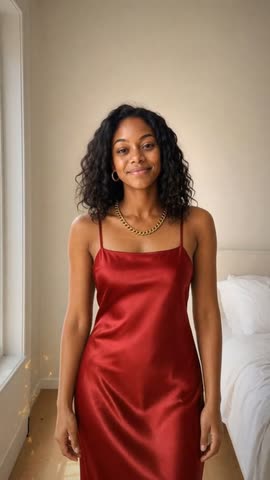
1 Light sweep
A band of warm golden light travels down you from the shoulders, and the outfit is on behind it, sparkles trailing the edge. The default, and the one that reads clearest on a first watch.
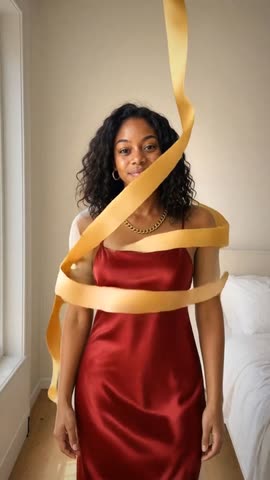
2 Ribbons
Ribbons of gold spiral up from your feet to your shoulders, changing the clothes as they pass, then unwind away. The busiest of the four — strongest when the room behind you is plain.
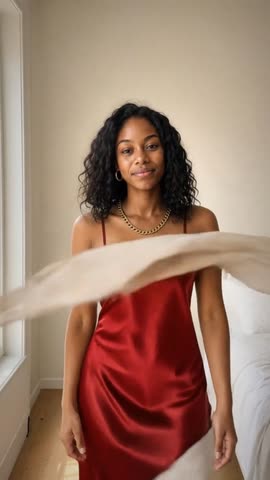
3 Silk
A length of flowing silk whips across the frame, hides you for a beat, and is gone. Cloth does the work and nothing glows — the pick if gold sparkle is not your aesthetic.
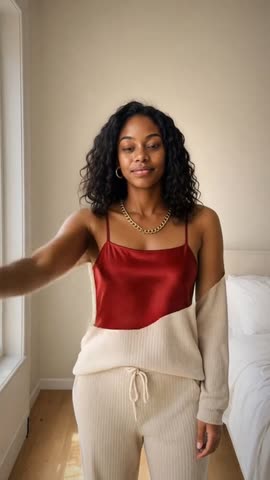
4 Hand swipe
You raise a hand across the lens and the change happens entirely behind it. The most physical of the four, and the one that looks least like an effect.
A get-ready-with-me costs a whole evening of filming for a few usable seconds, and the part everyone actually watches — the moment the outfit lands — is the one bit you cannot stage twice. Film it handheld and there is a phone in every shot. Prop the phone up and you spend the whole time walking back to it. Meanwhile the outfit itself, the part you agonised over, gets three blurry seconds on a hanger. This builds the same video out of three photos you would take anyway: you before, the outfit laid out on the bed, you dressed. The close-ups come from the flat-lay, the reveal is a real transition between your own two photographs, and nothing is filmed.
Perfect for
Some moments this fits — there are more.
Night out
The classic. Loungewear to the outfit, with the shoes and the jewellery each getting their own beat.
Wedding guest
Show the outfit properly before the day buries it in group photos taken from forty feet away.
Eid, Diwali or a family celebration
Traditional dress rewards the close-ups — embroidery and gold read beautifully punched in.
Prom or graduation
One photo before, one after, and the reveal carries the whole getting-ready story.
A new purchase worth showing
A haul post where the clothes get looked at instead of held up to a mirror.
Festival or party fit
Bold outfits and bold reveals go together — ribbons or silk over the light sweep here.
Interview or first day
A suit, good shoes and a watch laid out the night before, and you in it the next morning.
Tips for the best result
A few small things make a noticeable difference.
- 1
Three separate pieces in one photo, none of them buried
The AI gives one cut each to three things it can find, in order — the garment, the shoes, then the jewellery — so aim for at least three separate pieces in the one flat-lay. A necklace lying on the dress is exactly right; it is small enough to read as its own thing. A bag or a shoe does better beside the garment than laid across it. Anything buried underneath cannot be found at all, and with fewer than three pieces the video uses one slow push across the whole photo instead of three close-ups.
- 2
The flat-lay has to be the outfit you end up in
The reveal is told to put the clothes from the flat-lay onto you, and the last shot is your own photograph — so if the laid-out outfit and the dressed photo disagree, the transition has to invent the difference. Photograph what you are actually about to wear, shoes and jewellery included.
- 3
Same spot, same distance, both photos
The reveal is a real transition between your before and after photographs, not a crossfade. The closer the two framings match — same place, same distance, same camera height — the more it looks like the clothes changed on you rather than the shot cutting.
- 4
Full length and vertical
Shoot both photos of yourself head to toe in portrait. The reveal travels down the body, so a waist-up crop loses most of the move, and the shoes never get their moment.
- 5
Light both photos the same way
The reveal travels between your before and after photographs, so a colour shift between them travels with it — daylight in one and a bedside lamp in the other reads as a grade change rather than an outfit change. Same window, same time of day, both shots. Even light also keeps the flat-lay close-ups clean of hard shadows.
How it works
- 1
Take three photos
You in what you are already wearing, the outfit laid out, and you dressed in it. Stand in roughly the same spot for the first and the last — that is what makes the reveal land.
- 2
Pick a reveal and a soundtrack
Light sweep, ribbons, silk or a hand swipe, plus one of six instrumentals — Night Out, Sparkle, Warm Night, Disco, Strut or Afrobeats. The music is included, so it costs nothing extra.
- 3
AI cuts it to the music
The flat-lay is read and cut into three close-ups — the garment, the shoes, the jewellery. The reveal fires on the drop, just under five seconds in, then the video settles on your own photograph and a sign-off card. About 17 seconds end to end.
Frequently asked questions
Other ways to make it
Time travel selfie
One selfie. Pick a decade. Watch yourself transform.
Read morePhoto to anime
Upload a portrait. Watch yourself transform.
Read moreCartoon yourself
Become a big-head cartoon — then watch it come alive.
Read moreAction movie trailer
See yourself as the hero of your own action movie.
Read moreReady to try it?
Free tokens at signup — no card needed.